

QuickBooks Premier 2018
QuickBooks Premier 2018
QuickBooks Desktop Premier 2018 is here, offering some great new features and a modernised user interface. QuickBooks is always looking to make its software quick to learn and quick to use, but with this upgrade, QuickBooks is trying to redefine the entire realm of digital accounting with the ultimate aim of enabling it’s users to get more done, improve cash flow and fulfill their order commitments with faster and more accurate inventory.
60 days money-back guarantee. Special Offer: Your purchase of QuickBooks Desktop Pro 2018 includes free trial 30-days of the Quickbooks Offline.
QuickBooks 2017 saw
the introduction of some great features such as ‘show filter,’ ’communication
tool’ and ‘smart search.’ These features were well received by the QuickBooks
community and the forthcoming version of QuickBooks sees even more enhancements
to make the QuickBooks 2018 user experience even better.
QuickBooks Desktop
2018, like all previous versions, has been tailored for small and medium sized
enterprises. A plethora of new features have been introduced in order to
redefine the user experience for both accountants and non-accountants. Let’s
look at some of these features in detail:
Multi Monitor Support
To manage finances or
to reconcile accounts, one may need to refer to multiple different forms and
accounts. This can be simplified with the multi monitor support. Through this
feature, users can view multiple windows of QuickBooks on multiple monitors.
Hence, tallying transactions won’t be as onerous.
Merge Multiple Vendors
The new version of
QuickBooks enables you to simply merge multiple vendors. Consolidating multiple
vendors into one makes it easier for users to manage multiple vendors. Further,
users can search for duplicate vendors and merge their records together.
Records will be sorted according to time. Past versions allowed only two
records to be merged, but QuickBooks 2018 allows users to merge 4 records at
once.
Switch Between Accrual and Cash Basis
Selecting the right
basis for accounting can be a difficult situation for organisations. Accrual
basis has always been the choice of medium sized enterprises, whereas cash
basis is preferred by small businesses. Now you can use both these accounting
basis as switching between the two has never been easier. With QuickBooks 2018,
users can switch accounting basis directly through the Reports window.
New Keyboard Shortcut
New shortcuts have
been introduced in order to boost the productivity of users. Through these
shortcuts, complete lines of transactions can be directly copied and pasted.
Some of the new shortcuts introduced include CTRL + ALT + Y and CTRL + ALT + V.
Past Due Stamp
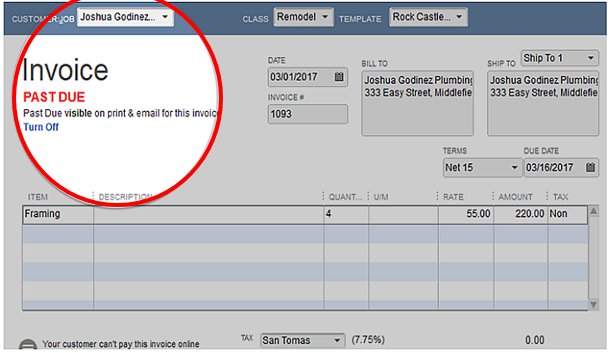
If you resend copies
of past-due invoices to your customers, this feature makes it clear that they
are past due accounts. This is a flexible feature and allows this to be
customised, but will help with improving cash flow as this is automatically
generated.
Chart of Accounts Search
In previous versions
of QuickBooks, it could take minutes to search for particular accounts in
QuickBooks. With QuickBooks 2018, the search feature for chart of accounts has
been enhanced. In the 2018 version of QuickBooks, a user can search for a
particular account through a partial name, full name or account number.
Security
Security is a major concern for most
organisations and this has therefore been a big focus for the QuickBooks
development team for the past couple of years, and that continues this year.
Security is indeed essential, since these books contain confidential
information such as Personally Identifiable Information (including credit/debit
card details, names and addresses of customers and vendors, and so on.) EasyBiz
QuickBooks has addressed these security concerns via QuickBooks 2018. Email integration has been
further secured. Further, encryption for Personally Identifiable Information
has also been provided and the use of passwords has been reduced without
compromising on security to offer a more user-friendly experience.
Says Gary Epstein, MD
Of EasyBiz QuickBooks, “QuickBooks is proud to announce the arrival of
QuickBooks 2018, the latest software release that boasts a number of
user-friendly enhancements which will allow our users to get more done, faster
than ever. As always, the latest version of QuickBooks retains the simple, easy
to use functionality that is synonymous with the QuickBooks brand. QuickBooks
Desktop 2018 offers software features across the full range of QuickBooks
packages, from QuickBooks Pro to QuickBooks Premier and QuickBooks Accountant,
meaning that there is a package to suit all small to medium and growing
businesses, all aimed at allowing users to get more done, improve cash flow and
fulfill their commitments with faster and more accurate inventory.”

QuickBooks 2018 Desktop: What's New – Our Summary
Traditionally, Intuit has had a focus within each new QuickBooks Desktop product release that either was intended to provide features for general users, features for accountant users, features for Enterprise users, or in some cases major technical changes.
This year, it seems there are changes for everyone.
According to Intuit, the two most warmly received changes measured during trial testing are the new Multi-monitor Support feature and the security change associated, which allows users to "Remain Logged-in."

Without further ado, here's a list of what's new:
- Multi-monitor Support
- Remain Logged-in
- Search Chart-of-Accounts
- Cash/Accrual Toggle on reports
- Past Due Stamp on Invoices
- Enhanced Inventory Reports (customize columns)
- Webmail Users: Secure Webmail
- Payroll Users: Payroll Liability Reminder
- Accountant Users: Merge Multiple Vendors
- Enterprise Advanced Inventory Users: Sales Order Fulfillment Enhancements and Portable Scanner Option (and more) for Order Fulfillment
- Enhanced Security and Behind-the-scenes Improvements
Multi-monitor support (for up to three monitors) makes it easy to move a QuickBooks window to a different monitor than the monitor where QuickBooks was resident. It also means that pop-up windows associated with the working window will appear on the correct monitor. That means no more having to track down pop-up messages hidden behind an un-associated window.

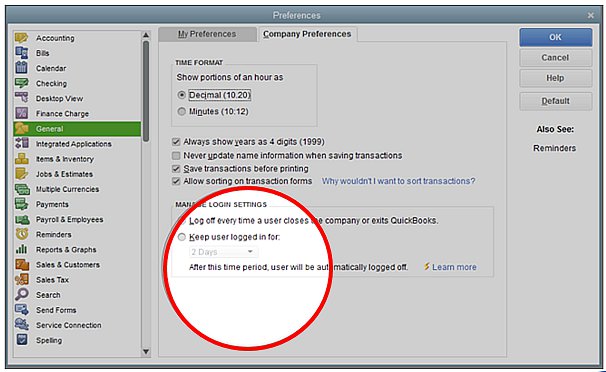
QuickBooks 2018 Desktop versions allow you to elect to Remain Logged-in to QuickBooks. That means you don't have to log-in every time you open or switch Company files. This is an optional preference, so in my feature article, I'll address "the good, bad and the ugly" safety and security aspects of this new preference.
Ever have a hard time tracking down that account you know exists, but you just can find it in your COA? The reason is QuickBooks has never had a search feature within the Chart of Accounts list. But new for 2018 is the Chart-of-Accounts Search-box, which allows you to search by part or all of an Account Name or Number.

No more going through the motions of customizing your financial reports just to change the accounting basis. New for 2018 QuickBooks Desktop has added a Cash-Accrual Toggle right on the report to make changing your reports easier than ever.

QuickBooks 2018 Desktop displays a Past Due Stamp when viewing past due invoices. You can also elect to have the Past Due stamp print on invoices in either printed or PDF formats.
This new feature for 2018 is not only a quick way to identify your past due invoices, but also a way you can remind your customers they're beyond your payment terms.

System requirements for QuickBooks Pro or Premier 2018 and Enterprise 18.0
Operating Systems
Microsoft no longer provides security updates or support for PCs running Windows 7 and Windows Server 2008. For your data’s security, we recommend upgrading your operating system to a supported version before installing QuickBooks.
To know more about how it affects QuickBooks, check out related help articles for Windows 7 and Windows Server 2008.
- Windows 10, all editions including 64-bit, natively installed
- Windows 8.1 (Update 1) all editions including 64-bit, natively installed
- Windows Server 2016
- Windows Server 2012 R2
- Windows Small Business Server 2011, Standard and Essentials
Note: QuickBooks requires you to use Windows natively and not through an emulator or virtual environment.
Database Servers
- Windows Server 2016
- Windows Server 2012 R2
- Windows Server 2011 SP1
- Windows 10
- Windows 8.1 (Update 1)
- OpenSuse 42.2
- Fedora 25
- Red Hat 7 (Update 3)


 Posts
Posts


No comments